







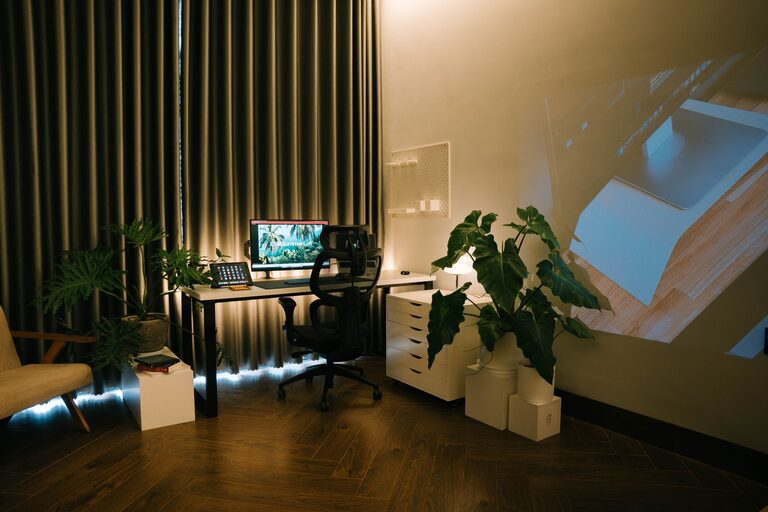
Working from home has become increasingly common, making it more important than ever to create a workspace that supports productivity and comfort. Your environment can have a big impact on how well you focus and how much you enjoy your workday. This guide offers useful advice on setting up a home workspace that encourages concentration and keeps you comfortable throughout the day.
Choose the Right Location
The first step is selecting a suitable spot in your home for your workspace.
– Find a quiet area: Try to pick a place with minimal distractions. If you share your home with others, choose a space where you can work without frequent interruptions.
– Consider natural light: Position your desk near a window if possible, as natural light helps improve mood and focus. Avoid glare on your screen by placing your monitor perpendicular to the window rather than directly in front.
– Think about space: Make sure the area is large enough to fit your desk, chair, and other equipment while still allowing for comfortable movement.
Invest in Ergonomic Furniture
Comfort directly affects productivity and wellbeing, so prioritise ergonomics when selecting furniture.
– Ergonomic chair: Choose a chair that supports your back and encourages good posture. Adjustable height and lumbar support are key features.
– Desk height: Your desk should be at a height where your forearms rest comfortably parallel to the floor when typing.
– Consider a standing desk: If you prefer, an adjustable sit-stand desk allows you to change positions throughout the day, reducing fatigue.
Organise Your Workspace Efficiently
A tidy and organised workspace helps reduce distractions and saves time.
– Declutter regularly: Keep only essential items on your desk. Store other materials in drawers or shelves.
– Use storage solutions: Desk organisers, trays, and filing systems can keep papers and stationery neat and accessible.
– Cable management: Use clips or cable ties to keep cords organised and prevent tangling.
Personalise Your Environment Mindfully
Adding personal touches can make your workspace more inviting, but it’s best to balance this with practicality.
– Plants: Small indoor plants not only brighten your space but can also improve air quality and reduce stress.
– Artwork or photos: Choose calming or inspiring images that boost your mood without distracting your attention.
– Lighting: Consider adding a desk lamp with adjustable brightness to supplement natural light, especially during darker hours.
Minimise Distractions
Limiting interruptions will help you maintain focus during work periods.
– Use noise-cancelling headphones: These can block out background noise, making it easier to concentrate.
– Set boundaries: Communicate your working hours to household members to reduce disruptions.
– Digital focus apps: Tools like website blockers or timer apps can help you stay on task and manage breaks effectively.
Maintain Good Air Quality and Temperature
A comfortable atmosphere supports sustained concentration and wellbeing.
– Ventilation: Ensure the workspace has good airflow. Open windows regularly or use a small fan or air purifier if needed.
– Temperature control: Keep the room at a comfortable temperature. Layers of clothing can help you adjust personally without affecting the whole household.
Establish a Routine
Creating structure around your work hours helps train your mind to focus during specific times.
– Set regular hours: Try to start and finish work at consistent times.
– Scheduled breaks: Short breaks refresh your mind and reduce fatigue. Use these moments to stretch or move around.
– Morning preparation: Treat the start of your workday as you would in the office—get dressed and set up your workspace before beginning.
Maximise Technology Efficiency
Using the right technology thoughtfully can enhance your home working experience.
– Reliable internet: Ensure your connection is fast and stable to avoid frustration during calls or file sharing.
– Monitor and keyboard: A larger screen and external keyboard can reduce eye strain and improve comfort compared to working on a laptop alone.
– Backup power: Consider a surge protector or uninterruptible power supply for essential devices to avoid data loss during outages.
Stay Active and Stretched
Physical comfort is not only about furniture but also about movement.
– Stretch regularly: Take time to stretch your neck, shoulders, back, and wrists to avoid stiffness.
– Standing breaks: If you use a sitting desk, stand and move around every 30-60 minutes.
– Exercise: Incorporate light exercises or walks outside to refresh your body and mind.
Final Thoughts
Creating a productive home workspace is a combination of choosing the right environment, using ergonomic furniture, keeping organised, and maintaining good habits. When your workspace supports your physical comfort and minimises distractions, you’ll find it easier to focus and feel more satisfied with your work. Take time to experiment with your setup until you find what works best for you. Small changes can make a significant difference in your daily productivity and wellbeing.